Backend Deployment
Prerequisites for SAP BTP
To support the application’s core functionality and cross-system connectivity, ensure the following SAP BTP Service Instances are provisioned and configured within the target subaccount and Cloud Foundry space:
- SAP Cloud Foundry (CF) Application Runtime
- SAP HANA Cloud
- Cloud Identity Service (optional)
- Authorization & Trust Management
- Connectivity Service (optional)
- Destination Service
Additional Requirements
- Config Server: Must be fully operational with a reachable public/internal URL.
- Backing Services: You must have instances of a Database Schema, XSUAA, and the Destination Service created and available for binding.
- IWA 2.0 (Conditional): If your architecture utilizes IWA 2.0 for role and user management, the IWA microservice must be deployed first, as its endpoint is a required configuration parameter.
Deployment Configuration (Manifest)
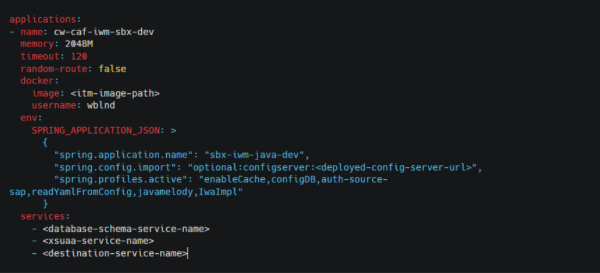
The spring.config.import property must be prefixed with configserver to ensure the application bootstraps its configuration correctly from your central repository.
spring.config.import=configserver:<CONFIG_SERVER_URL>
Frontend Deployment
Deploying a React Application as an MTA Application
Overview
This document outlines the approach to deploy a React application to SAP Business Technology Platform (BTP) using the Multi-Target Application (MTA) model.
The MTA approach enables structured deployment, better modularization, and seamless integration with SAP Cloud Foundry services.
Key Objectives
- Convert a React application into an MTA-compliant structure
- Enable deployment on SAP Cloud Foundry
- Configure routing and deployment modules
- Ensure smooth local testing and production deployment
Architecture Summary
An MTA-based React deployment typically consists of:
- UI Module (React App) – The frontend application
- App Router – Handles routing, authentication, and request forwarding
- UI Deployer – Responsible for deploying static content
- MTA Descriptor (
mta.yaml) – Defines modules, resources, and dependencies
Setup & Prerequisites
Required Installations
- Node.js and npm
- Cloud Foundry CLI (CF)
- Visual Studio Code
Installations
Run the following commands from Command Prompt:
npm i -g @sap/cds-dk
npm install -g mbt

cf install-plugin multiapps
cf install-plugin -r CF-Community "html5-plugin"
cf add-plugin-repo CF-Community https://plugins.cloudfoundry.org
Run the Application Locally
cd <application-codebase-path>
npm install
npm start
Deploy the Application to BTP
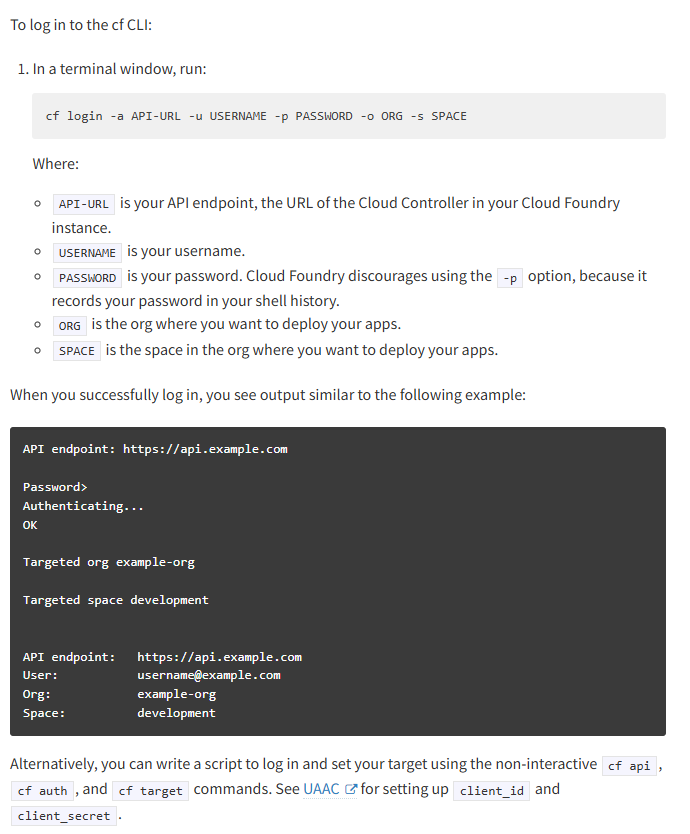
Login to Cloud Foundry
Build and Deploy
cd <application-codebase-path>
npm install
npm run build
cd ..
mbt build
After a successful mbt build, the mta_archives folder will be generated.
Inside this folder, the .mtar file will be available, which is used to deploy the application to BTP.
cf deploy mta_archives/<filename.x.y.z.mtar>
Troubleshoot Issues
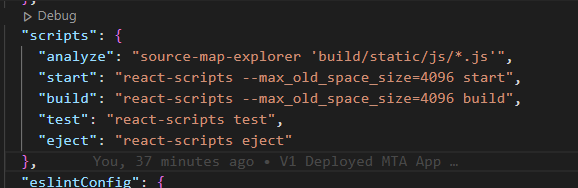
JavaScript Build Exceeds Max Heap Size
If the JavaScript build exceeds the Max Heap Size during npm run build, increase the memory allocation by adding --max-old-space-size in the package.json build script.